Category: Editing & Writing Tips

  • Surprising Connections Between Horror and Romance

    Surprising Connections Between Horror and Romance

    At first blush, horror and romance might seem as far apart as two genres can be. But on closer inspection, the genres exhibit many similarities.

    Beyond the story-level connections, the readerships of these two genres share a protectiveness born from the feeling others look down on their genre of choice as being of low merit, of not being literary enough, of being trashy, even. Sometimes the reaction is just a dismissive curl of the lip.

    Horror and romance contain both purely entertaining page-turners and examples of high “literary” merit (the quotes here suggesting “whatever the hell that means” and “but that’s a topic for another day”).

    In my experience people will often look down on horror and romance in a way they wouldn’t about mysteries or suspense, so that sense of protectiveness is understandable. This snobbishness might be more true in the past, and both genres might be more widely accepted today than ever before, but the attitudes still seem to exist, at least on some level.

    Horror and romance are cherished by their readerships, and these stories help readers process their lives. They act as a salve in troubled times. Sometimes they simply entertain and are in fact trashy in the best way. And there’s nothing wrong with that.

    All About a Feeling

    It’s been said by Tananarive Due and others that horror is an emotion, and this defines the genre in a special way and in fact makes the genre hard to define (and also more expansive). Romance is certainly all about love and the associated emotions.

    So at the heart of both genres is the evocation of feeling in the characters, and not just feeling, but intense, life-altering feeling.

    In “Horror and Romance: Doppelgangers in Need,” horror writer L. Marie Wood talks about how need (want, desire, yearning) is essential to both genres, and it’s a fascinating piece.

    Which Genre Are We Talking About Again?

    If you think about a force that insinuates itself in people’s lives and begins to change them, begins to affect them in physical ways (raised heartbeat, shortness of breath), begins to draw them toward something close to an obsessive relationship, you might be excused if you aren’t sure whether we’re talking about horror or romance.

    This force might be evil in horror and love in romance, but in both it’s a force that cannot be shaken, that persists, that holds the promise of forever.

    HEA and HEN

    A romance without a happily ever after (or a happy for now) is not a romance. That’s part of the promise to the reader, and romance writers feel the heat if they break that promise.

    Horror contains something you might call a happily ever never. While a character might in the end triumph over the evil in question, that triumph often comes at a great cost, and there’s usually the sense that the evil hasn’t been truly vanquished, that it’s only been momentarily thwarted before it rises again.

    Meet-Cute and Meet-Brute

    A romance needs a meet-cute to introduce the love interests and set them on the path toward romance. Well-deserved praise to romance writers coming up with fun and innovative meet-cutes that go beyond the characters literally bumping into each other.

    In much the same way, the protagonist in a horror story needs a meet-brute (yeah, I don’t think this term has much chance of catching on, but thanks for humoring me) to expose characters to the presence of evil. In both romance and horror, characters’ first reactions are often to flee from this scary force (“I don’t have room in my life for a relationship!” or “I don’t want to be consumed by this demon!”).

    This is another good point to emphasize again the physical responses in horror and romance. In romance, the mere touch of a new love interest (and it might be the slightest brushing of hands) draws an outsize physical reaction from the character, who consciously acknowledges the reaction or tries desperately to dismiss it.

    In horror the racing pulse or shortness of breath at that first touch of evil is just as present, and it will only get worse. That’s also a promise to the reader.

    Isolation

    In horror characters are often isolated in ways that make them more vulnerable to evil and that connect them closely to primal childhood fears, such as being lost in a forest or shopping mall. The character may be physically stranded in a cabin or cave, or they may be emotionally stranded when no one around them believes that true evil is present.

    Romance also often isolates its love interests to make them more vulnerable to the force of love working its magic on them. They may, in fact, be snowed in at a cabin. Or they may be forced to share a bed. Or any number of other scenarios. But that isolation is often key.

    Teasing Out the Romance / Showing the Monster

    In one of my favorite podcasts about horror movies, Pod Mortem, the hosts talk about how part of the reason movies such as Nightmare on Elm Street and Child’s Play work so well (and specifically the first film in each series) is because the creators know to use Freddy and the evil doll sparingly, that giving them too much screen time, too early, spoils the fear.

    Similarly, romance often works best when the characters are kept from that full-fledge romance for as long as possible, because throwing them right together can spoil that delicious sense of tension and Will they or won’t they? (though of course we know they will).

    Don’t Go in the Basement: Tropes, Tropes, Tropes

    Horror and romance are often filled with tropes, conventions, and obligatory scenes, and each does well when it addresses these in new and interesting ways.

    Is there a compelling reason for the character to go into the basement when common sense is screaming to do anything but? Is the third-act breakup drawn from compelling character motivations or thrown in unrealistically because the author is at the 75 percent mark?

    The Grand Gesture / Sacrifice

    In romance a character often makes a grand gesture to win back their love interest after the aforementioned third-act breakup. This works best when the character gives up something they thought they needed because they’ve realized what it is they actually need.

    In horror a character will often need to make a great sacrifice, possibly their life or even their soul, to defeat evil. (And knowing that evil never dies we can say only, Hey, good luck with that.)

    I Love You / I’m Going to Tear Your Soul Apart

    Horror and romance might seem strange bedfellows, but thinking about the connections between the two is a lot of fun, and we didn’t even bring into the mix Gothic literature, which excels at entwining romance and dread. Are there any other connections that spring to your mind?


    Further Reading:

    Wood, L. Marie. “Horror and Romance: Doppelgangers in Need.” Chosen Realities 1 (Summer 2020).

  • Beyond Spell-Check: Ten Catches Copy Editors Make

    Beyond Spell-Check: Ten Catches Copy Editors Make

    [vc_row][vc_column][vc_column_text css=””]Spell-check will fail to catch an almost unlimited number of writing miscues. In addition to spelling, copy editors address grammar, punctuation, style (hello, Chicago Manual), clarity, and consistency.

    The following ten items will give you some idea of what spell-check won’t catch.

    (Also note that I’m not addressing punctuation here and that while Word’s Editor function features a grammar check that will occasionally offer good suggestions, the many false positives and sometimes downright bizarre suggestions mean that you cannot accept any of the suggestions without a high level of discernment.)

    1. Wrong homophone. I can’t bare to see another picture of a bare. (Read: I can’t bear to see another picture of a bear.)
    2. Missing words. I can’t bear see another picture of a bear. (Read: I can’t bear to see another picture of a bear.)
    3. Transposed words. I can’t bear see to another picture of a bear. (Read: I can’t bear to see another picture of a bear.)
    4. Repeated words. This one’s obvious, and while spell-check will flag repeated words, it can’t determine whether the repetition was intentional.
    5. Repeated endings. Our brains sometimes do a funny thing where they inappropriately repeat an ending while typing: They keeping walking toward … (Read: They keep walking toward …)
    6. Echoes. Words repeated in proximity can clang against the ear of the listener. Often words like up and back (two prime offenders) can be deleted or switched out when they repeat too closely.
    7. Danglers. Dangling participles and other modifiers can cause problems, especially at the beginning of a sentence: Running into the classroom, the trash can caused me to trip. (The trash can wasn’t running into the classroom, so the person needs to be the subject instead.)
    8. Noninclusive language. Copy editors can call authors’ attention to potentially problematic language. The Conscious Style Guide and Crystal Shelley’s Conscious Language Toolkit are two great resources.
    9. Continuity issues. If a character’s eyes change color halfway through a manuscript, there should probably be a reason. Copy editors will comment on a wide range of continuity issues that can occur in a manuscript.
    10. Inconsistently applied style. Writers face a host of decisions for how they will style such things as thoughts and the words on signs, buttons, and other objects. The copy editor will help maintain consistency, keeping in mind author preference and style guidance from the big style guides (hello again, Chicago Manual) and publisher house styles, if working with a publisher.


    These often seemingly easy catches pose problems because writers (and editors too!) have a difficult time editing their own work. They simply know their work too well and see what should be there rather than what is actually there.

    Another set of eyes does wonders![/vc_column_text][/vc_column][/vc_row]

  • Continuity, Part 1: Continuity Issues and Why They Pose Problems

    Continuity, Part 1: Continuity Issues and Why They Pose Problems

    “Only by thoughtful concentration on details can fiction be satisfactorily edited.”

    Words into Type

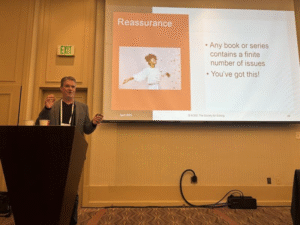
    [On April 4, 2025, I presented “The Case of Ever-Changing Eye Color: Tracking Continuity in Manuscripts” to a live audience at ACES 2025 in Salt Lake City. This series of posts is largely based on that presentation.]

    What Are Continuity Issues?

    Continuity issues refer to discrepancies among details an author has provided in their manuscript.

    Usually these issues relate to physical character traits, nonphysical character traits, plot events, and matters of time, place, and distance.

    When the author provides information about a character, that information should be consistent throughout the manuscript unless there’s a good reason (a character’s hair might change color because they’ve dyed it).

    Discrepancies in the passage of time, the physical properties of setting, and the distance between settings (and the time it would take to travel between places) all present innumerable opportunities to introduce continuity issues.

    Continuity issues are present when the reader asks questions such as the following:

    • Didn’t this character have blue eyes in chapter 3?
    • How is it Saturday when four days have passed since Thursday?
    • How did this character just enter the room when they were already in the room?

    Continuity issues may occur within scenes, across scenes and chapters, and across books in a series. So copy editors face a daunting task when helping authors maintain good, uninterrupted continuity in their stories.

    James Gallagher speaking behind a lectern at ACES 2025 in Salt Lake City

    Why Are Continuity Issues a Problem?

    Readers are savvy at picking up continuity issues—and they often aren’t shy about sharing them online. So it’s well worth it for authors and editors to do what they can to address continuity before a book makes its way into the world.

    Continuity gaffes can do the following:

    • Break the spell of an author’s storytelling and take the reader out of the work.
    • Diminish author authority and lessen the reader’s faith in the author.
    • Weaken the story.

    Depending on the reader and the magnitude of the continuity issue, reader response might range from indifference to mild amusement to slight irritation to a refusal to finish the book.

    For the author, the response might be embarrassment, awareness that they’ve taken a hit to their reputation, or irritation with their editor for not catching the issue.

    For the editor, the response might be mortification (no one is harder on the editor than that editor), awareness that they’ve taken a hit to their reputation, and even fear that they could lose their client.

    Next time we’ll look at why continuity issues occur, and we’ll explore how we can prevent them.

    Note: Presenting a session on continuity live and in person to a room of editors at a national conference is something I’ll never forget. Organizations such as ACES: The Society for Editing provide learning opportunities and access to an inspiring community of editors.

  • Five Reasons Copyediting Takes More Time Than You Might Think

    Five Reasons Copyediting Takes More Time Than You Might Think

    People are often surprised by the time it takes to copyedit manuscripts, probably because they have a sense of how long it takes to read a book of similar length. But copyediting does take longer—much longer—and authors and readers benefit from the hours upon hours copy editors dedicate to their craft.

    (This post refers largely to copyediting fiction, but the principles apply to nonfiction as well, though nonfiction generally takes even more time [often substantially more time] owing to such things as reference lists and technical content. Editors also develop processes that work best for them and their clients, so the following won’t reflect all processes of all editors.)

    WHY DOES THIS MATTER?

    Understanding the time to copyedit something effectively (and all that that involves) helps authors know what they should be getting from an edit, and it helps them weigh what is a reasonable fee for the copy editor’s work.

    What You Get

    As we’ll see, copyediting involves a lot more than people think. (I actually had a friend ask what more I needed to do after running spellcheck!)

    Authors often begin their search for an editor with the idea that they need only a “quick proof,” so all they’ll get from a copy edit needs to be learned (as well as the idea that they might also need a developmental or line edit).

    What You Pay

    If it takes an author twelve or thirteen hours to read through their manuscript, they might assume that the time to edit is somewhere in that neighborhood—and the price they’re willing to pay will understandably align with that.

    Authors might have a very different idea of a fair fee if they understand that the work involves not twelve or thirteen hours but thirty or more hours.

    Let’s say an author has a 300-page manuscript in standard format, and it takes that author twelve hours to do a read-through. This would have them reading at twenty-five pages an hour.

    Ten pages an hour is a pretty good clip for copyediting fiction. I’m usually below that when you average my main pass and proofing pass, but at ten pages per hour that 300-page manuscript would require thirty hours of work. So if an author is paying $200 for the job, they might begin to wonder about the quality of the work.

    FIVE REASONS COPYEDITING TAKES SO LONG

    The following five reasons for why it takes as long as it does to edit effectively should also give authors some reassurance about their editor’s commitment to their manuscript.

    1. Time Outside the Read-Through

    Editors do a number of tasks before the first pass, between passes, and at the end of the job, not to mention admin tasks such as communicating with the author, invoicing, and tracking the kind of data that helps editors constantly refine their systems and processes.

    Initial Cleanup

    Before that first read-through, an editor will rename a file according to their naming conventions and format the file so that it’s usable for editing.

    The latter usually means ensuring the manuscript is Times New Roman, twelve-point font, double spaced, with automatic indents and styled headings. Editor’s Toolkit Plus is a handy tool for snapping up spaces around returns, double spaces, and tabs and for formatting ellipses and smart quotes.

    The editor may run an initial pass of PerfectIt (a consistency checker), search for particular instances in the document, and run macros such as ProperNounAlyse (this pulls all the proper nouns from a document so an editor gets a heads-up on spelling discrepancies for people and place names).

    After the First Pass

    Here the author often runs spellcheck and PerfectIt, then reviews their notes and comments for continuity or sentence-level concerns to keep track of during the final pass.

    After the Proofing Pass

    Editors usually have a number of common cleanup searches, most of which can be built into PerfectIt. The editor will check their notes for any outstanding concerns, review their comments for tone and content (Do they address the issue, explain why it’s an issue, and suggest an alternative?), and clean up their style sheet (see more on style sheets below).

    Before returning the edited manuscript, the editor will draft an editorial overview (usually an email). I’ve also begun using Loom videos so I can show authors things like the navigation pane and aspects of using tracked changes (this also provides a nice, personal way for me to thank authors for having me as their editor).

    2. A Different Kind of Reading

    To do their jobs effectively, editors must read in a way that is slow and measured. Editors are always asking questions of the text and of the way it relates to the surrounding text in grammar and syntax.

    Readers often speed-read or even mentally switch off for passages, but editors must maintain strict concentration at all times, and they must manage their concentration and be aware of their limits per day and per hour, and rest accordingly.

    Editors also must be aware not just of sentence-level concerns like spelling but of continuity issues (such as discrepancies with the timeline and character details such as eye color) and of things like echoes or words and pet phrases throughout the manuscript.

    Time is also added for inserting edits, which are tracked, and for adding comments to explain edits or to query authors on matters of style or continuity. Editors will often use tools like TextExpander to more quickly insert frequently made comments, but editors inevitably also need extra time to carefully phrase other comments so that they are both kind and useful to the author.

    3. Constant Lookups

    MerriamFetch is one of my favorite macros, with good reason. (A macro is a program you can run within Word, and this macro automatically pulls up Merriam-Webster’s definition page for a selected word. Believe me, it saves a ton of time.)

    Spelling is more complicated than running Word’s spellcheck. Spellcheck helps, and editors should run it, but editors are usually editing to a dictionary outside of Word (I’m usually editing to Merriam-Webster).

    Editors also have to decide their approach when word variants are listed in the dictionary. Usually it falls to the first-listed variant, but editors will also take into account author preference and add exceptions to the style sheet to account for this.

    Editors are also constantly breaking from reading the manuscript to look up issues in their style guide (for me that’s usually the Chicago Manual of Style). These may relate to punctuation or treatment of terms or use of numerals or capitalization or similar issues.

    Editors are also frequently turning to other resources, such as Garner’s Modern English Usage or the Conscious Style Guide or Crystal Shelley’s Conscious Language Toolkit.

    Fiction often requires fact-checking, so there are web lookups for things like the time it takes to travel between locations and even medical details. A copy editor’s lookup history can be, um, interesting.

    So many lookups!

    4. The Style Sheet

    While editing, the copy editor builds out a style sheet detailing general guidelines for editing and exceptions to these guidelines. An author may, for instance, prefer commas before sentence-ending toos and eithers.

    The style sheet also includes a word list of proper nouns and manuscript-specific spellings. Other items on the style sheet include character and setting details (so a character doesn’t have blond hair on page 10 and brown hair on page 110, unless a dye is involved, and so a character doesn’t go to the sixteenth floor of a ten-story building).

    The style sheet also includes a timeline by chapter that is a great help in addressing continuity concerns so, for example, five days don’t pass between Thursday and Saturday.

    5. Multiple Passes

    Editors have different processes. Some copy editors might run through only one pass. Others might run through more than two, but I usually do an intensive major pass and then a second proofreading pass using ReadAloud (hearing the manuscript read aloud is magic for finding such things as missing words, transposed words, and wrong words).

    Multiple passes, of course, add time to the job. In addition, editors may need to run streamlined passes for particular items, such as a specific continuity concern.

    TIME WELL SPENT

    Authors spend countless hours, even years, bringing their story into the world. Everyone, perhaps most importantly the eventual reader, benefits when authors and editors understand each other’s processes and the associated time each involves.

    Writing takes time. Editing takes time. When a book is in a reader’s hands and a story is firing that reader’s imagination, the reader might not have a true concept of all the time that went into the book’s creation, but they will undoubtedly feel it in every chapter, scene, and sentence.

  • Editing Is a Conversation

    Editing Is a Conversation

    Too often people view editing as a one-way service in which the editor “corrects” the author’s prose. To get the most out of the author–editor relationship, however, it’s important to remember two things:

    • Editing is a conversation.
    • Edits are suggestions.

    (Though general principles still apply, the following is geared toward the relationship between indie authors and editors. In traditional publishing the author will usually not communicate directly with the copy editor or proofreader.)

    The Conversation: Working Together

    The author and editor are partners working in service of the reader. This relationship is laid out beautifully in one of my favorite books—The Subversive Copy Editor by Carol Fisher Saller. (I will never stop recommending this book!)

    The editor is there to help the author and to honor the author’s voice. As with any good conversation, this means that the editor must practice the art of listening so that they can hear that voice before they can edit effectively.

    Of course, editors also bring expertise that authors may not possess. This expertise includes adherence with style guides and dictionaries, awareness of inclusivity concerns, and knowledge of publishing standards.

    But, again, it’s important to remember that the author’s voice should always be honored, so if maintaining that voice and serving the audience means bending a guideline, then that’s what the editor will do. Style sheets exist in part to record exceptions to style so that they can be applied intelligently and consistently.

    If an author has a style preference, they should let their editor know, and authors should feel empowered to “push back” against their editor. I’ve put that phrase in quotes because, when pushing back, authors will usually be surprised by how little resistance they meet.

    Edits Are Suggestions

    Whether an author is reviewing a tracked change or a comment, the author does not have to accept that change or suggestion. The author is paying the editor for the service, so it’s advisable to consider the editor’s suggestions, but the author always has the power to reject an edit.

    If an author feels as though they’re fighting their editor every step of the way and arguing every change, then that’s probably a good sign either that they’re not ready for editing (which requires an openness to being edited) or that they’re working with the wrong editor.

    If the former, then the author may need to open themselves to being edited and remember that the editor is there to help. It’s easy to be defensive, but too much defensiveness can work against the reader.

    If the latter, then the author may need to rethink the relationship. A great author and great editor may not pair well for any number of reasons, and there’s nothing wrong with amicably parting ways.

    The Conversation

    Perhaps the most effective way to ensure that editing is a helpful conversation is to remember that it is a conversation. As with all conversations, politeness and respectfulness should be maintained at every stage, by both parties.

    Before Editing

    Sometimes an author–editor fit can be determined only by working through an edit, but authors can learn a lot about their editor by reviewing their website, social media posts, and listings in professional organizations.

    A sample edit shows an editor’s editing style (heavy, medium, or light), their ability to use basic markup functions, and their commenting style (a good comment should explain the issue, explain why it’s an issue, and offer a suggestion or resource).

    Email exchanges also indicate an editor’s professionalism, timeliness, and demeanor. Editors are sometimes open to video calls (though, of course, editors are notoriously introverted).

    During Editing

    The editor’s primary means of communication during editing is through tracked changes, comments, and the style sheet.

    While an editor will usually make silent edits to clean up such things as double spaces, spaces around returns, and straight quotes), these silent edits will be listed on the style sheet, and other edits will be tracked for the author’s review.

    This is part of the open conversation so that the author is fully aware of what the editor is doing and there are no surprises.

    Comments are essential for explaining edits, querying such things as continuity issues, and even offering the occasional “Well done!”

    Needless to say, an editor’s comments should never be condescending or mean spirited.

    The style sheet is a separate document that details general guidelines for editing, exceptions to style, a word list of proper nouns and manuscript-specific styles, a character list with character details (helpful to ensure such things as eye color don’t change during the course of the story!), setting details, and a timeline (a big aid for continuity concerns).

    After Editing

    When the editor returns the manuscript and style sheet, they will continue the conversation with an editorial letter (usually an email) covering the work. I’ve also been employing Loom to use video to add a personal touch and demonstrate such things as good practices for reviewing tracked changes.

    The conversation may continue if the editor will also be reconciling edits after the author’s review, and I always make it a point to encourage authors to send me any questions that arise while they’re reviewing the edits.

    The Ongoing Conversation

    It’s a beautiful thing when authors and editors work together to present readers with works that inspire, amaze, and take them to faraway places of wonder. Keep the conversation going, and make it a good one.

  • Caring for Myself Helps Me Care for Your Work

    Caring for Myself Helps Me Care for Your Work

    [vc_row][vc_column][vc_column_text]Time takes its toll. Editors (like authors) spend a lot of time at their computers. As the hours, days, and years go by, we’re well served to find little ways to reduce the stress on our bodies and minds.

    I turned fifty recently and am hoping to edit for decades to come. But I’m more and more aware of how much I need to take care of myself to do my best work.

    Little things add up. If I’m editing and can use something like find and replace or a macro to reduce the time it takes to perform a repetitive task, then I’ll save myself hundreds of hours over the years, reduce the stress on my body, and free my mind for more important editing tasks.

    One of my favorite macros (a program that runs within Word) is MerriamFetch, which lets me use a keystroke to bring up a Merriam-Webster search for the word where my cursor is located. Editors are constantly looking things up to see not only spellings but variants and words that are open, closed, or hyphenated. So this macro is a real time-saver.

    (Convenient example: I used MerriamFetch to look up “time saver” and found that Merriam-Webster has it hyphenated, so I then used my Hyphenate macro to save a few keystrokes while hyphenating it.)

    Here are five additional (and recent) accommodations I’ve made to care for myself while editing. They might help you too.

    1. Blue light–blocking reading glasses. These filter out blue light to reduce eye strain from long days at the computer monitor, and they also have my reading glasses prescription.
    2. Raised monitors. I use the monitor on my laptop and two external monitors. Ideally the monitor is situated so I can look at it level without hunching and creating neck strain, so I’ve used lifts and my desk riser to raise the level of my monitors.
    3. Desk riser. This is one of my favorite additions to my setup. The desk riser sits atop my desk and lets me easily switch to a standing-desk arrangement. In addition to taking regular breaks to move around, it is wonderful to stand and work for a portion of the day. (It was also relatively inexpensive compared to standing desks.)
    4. Split keyboard. This is the most recent addition to my setup, and I’m still adjusting to it, but I am feeling very positive about it. The split keyboard comprises two keyboard halves connected by a tether. With this unusual-looking keyboard, I can set the halves at a distance and angles that allow me to type with my arms at a more comfortable angle than the straight-ahead approach of traditional keyboards.
    5. Improved posture. This would seem an obvious accommodation, but I had to make a conscious effort to sit up straight and keep my mouse forearm parallel to the floor. I’d been experiencing arm pain, and this has helped alleviate that.


    James Gallagher is a writer and editor with more than twenty years of experience. James can be contacted at James@castlewallsediting.com.[/vc_column_text][/vc_column][/vc_row]

  • Staying Connected during Isolation

    Staying Connected during Isolation

    Isolating in our homes during the COVID-19 pandemic has undoubtedly increased the amount of time we’re spending in virtual spaces for business, pleasure, and education. 

    Before the pandemic, I had weekly meetings with clients on Google Hangouts and Skype, but since the shelter-in-place guidance I’ve seen a big increase in meetings via Zoom (not to mention sessions with friends and family on Houseparty).

    I’ve also participated in more online collaboration on Miro, and it’s hard to imagine that virtual collaboration will do anything but increase — whether or not we return to something approaching our old normal. 

    The following fun and informative offerings have popped up in recent weeks:


    That Word Chat with Mark Allen

    Former newspaper reporter and longtime copy editor Mark Allen (@EditorMark) has launched That Word Chat on Zoom. 

    Described as a “video chat with lovers of all things lexical,” the episodes air Tuesdays at 4:30 p.m. ET. The first episode featured a conversation with Mary Norris, the author of Between You & Me: Confessions of a Comma Queen and Greek to Me: Adventures of the Comma Queen.

    During the first episode, I looked from attendee to attendee and was struck by the number of respected editors in the virtual room — a real who’s who of Editor Twitter. It felt good to hang for a bit with these great editors.

    The second episode welcomed Word by Word: The Secret Life of Dictionaries author Kory Stamper and Steve Kleinedler, author of Is English Changing? At one point, the two took word suggestions and wrote on-the-fly definitions. 

    Though they made clear that coming up with definitions off the top of their heads was far from the real dictionary-writing process, it was still fascinating to get a glimpse of how they think — and it was also a lot of fun.


    Sentence Diagramming with Ellen Jovin

    Known on Twitter for her traveling Grammar Table, Ellen Jovin (@GrammarTable) has launched a series of classes on sentence diagramming.

    Whatever your reaction to sentence diagramming — be it a quizzical Huh? or a nostalgic Oh yes, I remember doing that — the first two classes have been a blast, and I look forward to the third.

    (I remember sentence diagramming from grade school nearly four decades ago and haven’t thought about it a lot since, so I’ve greatly enjoyed the creativity of drawing out sentences with a group of fellow editors.)


    ACES and EFA Webinars

    I value my memberships in ACES: The Society for Editors and the Editorial Freelancers Association (EFA), and both have offered free webinars to members during the pandemic (with ACES offering free webinars to nonmembers as well).

    Whether for learning something new or reinforcing knowledge, ongoing education is an important part of being an editor who provides the best possible service to clients. 

    I also find it can be a boost to mental health, because it feels like such a productive use of time (and while I’ve been lucky to maintain steady work during the crisis, the uncertainty around book publishing is just one of many stressors in this new world).


    ACES Annual Conference

    For many, ACES is almost synonymous with the organization’s annual convention, and I’ve been fortunate enough to attend past conventions in St. Petersburg, Portland, and Chicago.

    This year’s convention in Salt Lake City was canceled because of the pandemic, but ACES has scheduled a day of online sessions for May 1. Session topics include the following:

    • The Invention of the Modern American Dictionary with Peter Sokolowski, editor-at-large, Merriam-Webster
    • Grammar Arcana with Lisa McLendon, coordinator of the Bremner Editing Center at University of Kansas
    • Developing a Quality Editorial Process End-to-End with Samantha Enslen, president, Dragonfly Editorial, and Cynthia Williams, editor and project manager, Dragonfly Editorial
    • What’s New in the AP Stylebook with Paula Froke, lead editor, AP Stylebook, and Colleen Newvine, product manager, AP Stylebook


    I’m looking forward to these sessions and am grateful that the people at ACES have done what they can to replace their beloved convention.


    Evident Ink with Nancy Smay

    In addition to serving clients through Castle Walls Editing, I edit romance as a guest editor through editor Nancy Smay’s company Evident Ink, and I am happy to report that Nancy has launched a wonderful series of free live video sessions on Facebook (https://www.facebook.com/EvidentInk/). 

    Nancy welcomes new guests every week, with upcoming sessions including topics such as boosting your writing productivity and using tropes in fiction. The classes take place on Thursdays at 4:30 p.m. ET and are well worth checking out.


    Corona Con

    Because of the cancellation of the Scares That Care horror convention in Wisconsin, author Kelli Owen led the charge to put together a live stream replacement con on April 18.

    Guests included Jonathan Janz, Kelli Owen, Brian Keene, Mary SanGiovanni, Robert Ford, Tim Meyer, Matt Hayward, Wes Southard, Somer Canon, Wile E. Young, Stephen Kozeniewski, Aaron Dries, Bracken MacLeod, and moderators Sadie Hartman (MotherHorror of Nightworms), Bob Pastorella (This Is Horror), Steve Pattee (Horror DNA), and Shane Keene (Ink Heist).

    A link to the day’s events can be found here: 

    https://www.youtube.com/watch?v=GDnXscKJ4nY&feature=youtu.be

    All the sessions are worth watching, but the Jonathan Janz reading stands out as perhaps the day’s biggest bring-down-the-house moment. Reading from his forthcoming work The Raven, Janz delivered a master class in live reading.

  • Don’t Lift the Lid! Slow Cookers and Editing

    Don’t Lift the Lid! Slow Cookers and Editing

    Lifting the lid on a slow cooker, even for a second, supposedly adds thirty minutes to cooking time. In much the same way, there seems to be a disproportionate amount of time lost when an interruption takes editors out of their editing groove.

    If I’m editing a manuscript and have to stop to address a completely different matter, this shifting of gears takes my mind off the project and interrupts my flow. When you have forty or more hours ahead of you on a book edit, little bits of time lost can add up quickly and affect your ability to hit your deadlines.

    Most editors have to play a kind of scheduling Tetris to ensure they hit their deadlines and get their clients their edited manuscripts. Delays on one job can easily affect every other job on the schedule, so it’s no wonder editors are so serious about keeping their work moving.

    Managing interruptions is therefore a vital editing skill.

    Interruptions can include emergency requests for quick-turn assignments, personal and professional emails, phone calls, and face-to-face interactions with coworkers or family.

    The extent to which an editor is affected by an interruption depends on the following:

    • Nature of the interruption. Answering a quick question will obviously affect the job you’re working on less than needing to completely break to spend an hour proofing an emergency job. For such an emergency request, there might be research involved, or you might have to wait for more information from that client (and trying to work on one job while keeping an eye out for information needed for an emergency request is less than ideal, because it splits your thoughts).
    • Where you are in the editing process. An interruption might be easier to process if the work you’re doing is more mechanical (invoicing or answering emails or cleaning up your style sheet) than if you’re in the midst of hard-core, concentration-intensive editing.
    • Your state of mind. The more pressure you’re under to hit a deadline on your current job and the more concentration required by that job, the more likely you are to have trouble recovering from an interruption. Stress from outside sources (a pandemic affecting lives the world over comes to mind) will also likely have an outsize effect on how you handle interruptions.


    Interruptions are inevitable

    Interruptions, of course, are inevitable, especially for work-at-homers whose offices are no longer the quiet places they were before the COVID-19 crisis prevented family members from heading off to school or places of employment.

    While interruptions are unavoidable, they can be minimized by policing yourself (refraining from answering the phone or checking email and social media) and by communicating with those in your vicinity so they understand why you need quiet time and when it’s okay to break into that time.

    (Corporate clients are most likely to have emergency requests, and because corporate clients often pay higher fees, they enable editors to perform the lower-paying manuscript work that may be the editor’s true love. Editors, therefore, often need to accept emergency requests to keep paying their bills.)


    Breaks are not interruptions

    Interruptions can negatively affect your work, but breaks are a whole different ball game. After a ten-minute break at the top of the hour, you’re more likely to concentrate better than if you’d worked straight through.

    While an interruption can break your flow and make you feel like you’re not making the progress you want to make, little breaks can refresh you and enable you to work longer and more effectively. 

    These breaks can also have physical benefits if you use them to stretch, move around a bit, or even do a few arm curls. I don’t adhere to it as well as I should, but the 20/20/20 rule, in which every 20 minutes you focus on something 20 feet away for 20 seconds, can do wonders for eye strain.


    Low and slow

    As with a slow cooker meal, editing is usually best when done low and slow. This, however, isn’t always possible. If something drops on your desk and it’s needed in an hour, you might have to take that baby out of the slow cooker and throw it in the microwave.

    With this kind of triage editing, prioritization is everything, because you might not have time to address every aspect of the work. In these cases you have to identify the most important aspects of the work, ensure those are correct, and only then address less prioritized matters, if time allows.

    But I’ll always prefer the slow cooker to the microwave, and whenever possible, I’ll be taking it low and slow.


    Lots of ingredients

    As I continue to stretch the comparison, I’ll add that slow cookers are so effective because they (like editors) meld ingredients (skills) over consistent heat (effort and concentration). 

    For clients, the editor (slow cooker) they need is a complicated combination of specialty (developmental editor, line editor, copy editor, proofreader) and bona fides (certifications, client list, books published, referrals, fact-checking cred, familiarity with style guides, ability to work with tech tools, and knowledge of grammar, punctuation, and spelling).


    Preparation

    Slow cookers are all about preparation. That’s the magic: assemble all your ingredients, set the slow cooker, and let it do its thing for the next eight hours. 

    Preparation is just as important for enabling editors to edit, and preparation can take many forms:

    • Workspace: A dedicated workspace with plenty of room to operate, multiple monitors, and ergonomic accommodations makes for happy, healthy editors.
    • References: Whether accessing dictionaries, style guides, and other resources online or through your personal library, quick access to the references you need is essential.
    • Prework: Creating invoices, setting up your style sheet, and formatting your document all allow editors to get on with the business of editing their documents. 


    The flavors meld

    Editors spend long hours on any given job. While interruptions can’t be avoided entirely, they can often be minimized or dealt with effectively, leading to a meal (edited manuscript) that will have clients drooling.

  • Editing with Word’s Read Aloud Feature

    Editing with Word’s Read Aloud Feature

    After a publisher client suggested that all its editors try Word’s Read Aloud feature to help eliminate errors such as missing or repeated words, I decided to give it a shot.

    I hadn’t used the feature before and suspected I’d react badly to another voice in my head while editing. But for a last look at a document in the late stages of the editing process, I’m liking it more and more.

    (I touched briefly on this feature when writing about the benefits of reading aloud here.)

    What Is Read Aloud?

    Read Aloud is Microsoft Word’s text-to-speech function in Word 2016 (Office 365). You can access it on the Review ribbon or add it to the Quick Access Toolbar.

    When you select this function, the program reads the text to you, starting where the cursor is positioned. Each word is then highlighted as it’s read.

    A little control panel will also appear for jumping back a paragraph, jumping forward a paragraph, and playing/pausing the function.

    A settings button lets you adjust the speed of the reading, from painfully slow to lightning fast. You can select from three options for readers: Microsoft David, Microsoft Zira, and Microsoft Mark.

    I’m partial to Microsoft Zira.

    I set a pace at a little over halfway across the speed bar. Without halting the function for edits, this seemed to read through approximately thirty pages of a standard format (Times New Roman, 12 pt., double spaced) romance novel in an hour.

    How’s the Quality?

    For the most part, Real Aloud wasn’t glitchy. At one point it switched to Microsoft David for no apparent reason (disturbing!), and at another point the synching went off between the reading and the highlighting of the words. For each case, I paused the reading and hit play again, which fixed the problem.

    Zira’s voice would also periodically take on a raspy quality for the length of a paragraph, as though the program were encountering difficulty processing what was being read.

    I suppose this could have something to do with connectivity or my processing speed or an underlying code for that stretch of text, but this occurred only on certain paragraphs, and each time the reading went back to a fully voiced Zira at the start of the next paragraph.

    I was happy with the pace I’d set for the reading, but the program did pause (to my mind) overly long on paragraph marks, while the space between sentences seemed just right.

    Zira had little trouble with most words, though she occasionally read Olivier as Oliver, and for some reason she read sun as Sunday in a number of places (though not in all instances).

    The function didn’t pause at em dashes or ellipses, reading straight through in a way that a reader never would, and it read abs and expressions such as mmm as individual letters: a-b-s and m-m-m, respectively.

    Zira also had comical stumbles over Airbnb (though that’s a tough one) and Liberace (for which she read the last syllable as though it were the playing card).

    But the overall quality of the reading was high.

    My Process

    I usually have my second monitor (the one with the manuscript) turned portrait with the page at 150 percent.

    For the Read Aloud pass, I turned my monitor landscape and blew the manuscript up to 200 percent. This might provide “seeing the text anew” benefits both from the larger font and from hearing the text.

    As I listened, I “followed the bouncing ball” as Zira read and the words were highlighted. If I were reading as an author and not an editor, I could see a benefit in freeing yourself from the page entirely, but I was too afraid of missing homonyms or weird punctuation.

    Benefits

    Doing this kind of reading seemed to require less mental effort (Zira doing the heavy lifting of the read), and this let me move my eye around the text a bit while Zira read. It also may have enabled me to stay fresh for a longer period.

    The hope would be that lessening the mental energy of reading during the final pass would result in picking up errors that might otherwise have been missed.

    While it was a different editing experience, the internal error-detection alarm that went off when encountering an error was much the same. So the same editorial sensors seem to be at work, and I can easily believe that doing this kind of reading would help prevent my mind from filling in words that I “know” are there or that I expect to be there, but which really aren’t.

    An error that seems particularly illustrative is that of a man “siting at the counter,” which of course should have been “sitting at the counter.” The long i in siting jumped out in a way it might not have if reading without the audio.

    Without the audio, the context might cause you to read it as “sitting” and not catch the missing t until just after you’ve read the word, whereupon you would then back up and say, “Oh, they actually have ‘siting’ there.” Or the context might cause you to read it as “sitting” and not catch the error at all, which isn’t acceptable.

    Another benefit is that Read Aloud moves through the text on its own, so you don’t have to scroll or arrow through the document.

    At least for me, I found that doing a read that was markedly different from previous reads on the text renewed my enthusiasm for the read-through. Maybe it’s because it’s still a new process, but I am enjoying using the feature, and those positive vibes can’t hurt.

    I’d thereby list these as the benefits of using Read Aloud:

    (1) Less mental drain because you’re sharing the reading load

    (2) Better identification of missing and repeated words because your mind can’t automatically fill these in or gloss over them

    (3) Better identification of errors because of pronunciation clues

    (4) No scrolling

    (5) Renewed enthusiasm for additional read-throughs

    Drawbacks

    Initial edits on a document require too much hands-on-keyboard time to make it practical for early passes. Constantly pausing the reading to make edits would also grow irritating, so a last look with few expected errors is the only time I can see using the function.

    The function also doesn’t seem to work when tracked changes are showing, as it reads deletions along with inserted text.

    If you’re tracking changes, you’ll need to show “No Markup” to use the feature effectively.

    A final note is that, while the quality of the reading is high, a word mispronounced consistently through a text could set an editor’s teeth on edge.

    The following are therefore what I see as drawbacks:

    (1) Only practical for final passes

    (2) Does not play well with tracked changes

    (3) May contain irritating pronunciation errors

    Conclusion

    While I would not use the feature on initial passes on a document, I’m enjoying Read Aloud and will continue to experiment with it for final passes.

    Have you played with this feature?

  • I Like the Sound of That: Reading Aloud for Writers and Editors

    I Like the Sound of That: Reading Aloud for Writers and Editors

    Reading a manuscript aloud or listening to it being read can help writers and editors identify errors of spelling, grammar, or tone that they might miss otherwise.

    If you want to give this a whirl, you can read the manuscript out loud yourself, have someone else read it to you, or use a text-to-speech (TTS) function such as that supplied with Word.

    Too Close to the Work

    Reading the same text over and over creates familiarity, and this causes you to stop seeing what is there and to see instead what you think is there. Even if a word is missing, because you know it should be there, and because you can see it in your mind, you can easily read right past the omission as if it were actually there.

    This is why fresh eyes on a document are always valuable.

    To battle familiarity, people will often walk away from a document for long enough that it becomes new again. They might change the font or read the text backwards—anything to help them see the document as though for the first time.

    Reading aloud is another useful tool for addressing the familiarity problem. Reading aloud helps with identifying

    • Portions of the manuscript that need to be reordered
    • Inelegant transitions
    • Missing words (prepositions are notorious for going missing or popping up where they shouldn’t)
    • Errors of spelling, punctuation, and grammar
    • Inappropriate tone


    Reading aloud is also fun. For me, it sparks memories of my mother reading to me, and reading to my children at bedtime was one of the chief joys of my life. I read them Tolkien and Lewis, Terry Pratchett and Clive Barker’s Abarat, too many wonderful works to list. Together we explored new worlds, and I miss that.

    My first editing gig involved reading aloud as part of a proofreading team for a patent law firm. Patent files weren’t allowed outside the office, so my reading partner and I would go into the firm to do our work.

    (We can also note here that for all its benefits, hearing something read aloud won’t help you distinguish between homophones like “allowed” and “aloud.”)

    At the patent firm, my partner would read from the patent file and I would follow along in the patent printed by the Patent and Trademark Office, and then I would flag any discrepancies for inclusion on an errata sheet. You might not consider chemical and electrical patents to be riveting reads, but it was a good gig.

    I also spent nearly fifteen years as an editor for an audiobook company, so audio has been a big part of my life.

    When copyediting, I usually read aloud during my final cleanup pass, and I find this helpful for refocusing on the work.

    I haven’t incorporated Word’s TTS function in my processes yet, but it is something I want to investigate for helping me ferret out errors, and authors will likely find it helpful as well when editing their work (not to mention that it’s always cool to hear your work read aloud).

    Microsoft provides instructions for using the TTS feature here.

    The program’s reading is a bit robotic, but it’s not as bad as you might think, and (in Word 2016, at least) you can choose from three voices: Microsoft David, Microsoft Zira, and Microsoft Mark. You can also change the speed of the audio from painfully slow to nearly impossible to keep up.

    Word highlights each word as it’s read, so you can decide to listen as you pace the room or do a follow-the-bouncing-ball-style read along.

    For all the heat Word takes—much of it understandable—the program does have a lot of powerful features. Is Word’s TTS function something you’ve played with?

    (As a side note, studies have indicated that reading aloud helps boost memory and retain information, though the effects of listening to text read aloud are not as great.)


    ABOUT JAMES GALLAGHER

    I’m a copyeditor and the owner of Castle Walls Editing. If you have a manuscript and need a copyeditor, contact me through this site or email me at James@castlewallsediting.com.


    References:

    Microsoft Corporation. “Use the Speak Text-to-Speech Feature to Read Text Aloud.” Accessed December 17, 2018.  https://support.office.com/en-us/article/use-the-speak-text-to-speech-feature-to-read-text-aloud-459e7704-a76d-4fe2-ab48-189d6b83333c

    Railton, David. “Reading Aloud Boosts Memory.” Medical News Today. Accessed December 17, 2018. https://www.medicalnewstoday.com/articles/320377.php

    Writing Center, University of North Carolina at Chapel Hill. “Reading Aloud.” Accessed December 17, 2018. https://writingcenter.unc.edu/tips-and-tools/reading-aloud/